
If you're trying to understand mobile app development cost before speaking to any vendor, this guide was written for you. The short answer: building a mobile app typically costs between $5,000 for simple applications and upwards of $150,000 for complex ones — and that wide range isn't vague hand-waving. It reflects genuine differences in scope, technology, and the team you choose to build with.
Targeting the Gulf market specifically? This guide covers global pricing factors in general terms. If you are in Saudi Arabia, the UAE, or Qatar, start with our Gulf app development cost guide instead — it covers regional pricing, Arabic localisation and RTL costs, local payment gateway integration (Mada, STC Pay), and regulatory compliance requirements.
In 2026, global mobile app revenue is projected to surpass $600 billion — which means the market for well-built apps has never been more competitive, and business owners who understand what they're paying for consistently get better outcomes than those who sign contracts blind.
What Factors Drive the Cost of Building a Mobile App?
Before requesting any quote, understand that every development company builds its estimate around five core variables. Overlooking any one of them is how business owners end up surprised by invoices they didn't see coming.
1. App Complexity
A simple product catalog app is a fundamentally different project from a multi-role delivery platform serving customers, drivers, restaurants, and admins simultaneously. Every additional screen means more design, development, and testing hours — and a practical rule of thumb is that each screen adds $500 to $2,000 to your total.
2. Target Platform
iOS-only or Android-only costs less than building for both. That said, cross-platform frameworks like Flutter and React Native have narrowed this gap considerably — you can now target both platforms for roughly 30–40% more than the cost of a single platform, rather than doubling your entire budget.
3. Design Approach: Custom or Template?
Custom UI/UX design costs more but gives your product a distinct visual identity. A pre-built template lowers upfront cost but limits flexibility as your product evolves. Design decisions typically account for 15–25% of the total project budget.
4. Who Builds It
An independent freelancer typically charges $15–$40 per hour. A regional or local development agency runs $50–$100 per hour. According to contractrates.fyi, senior specialist developers in North America command up to $200 per hour. The premium isn't only about rates — it's about project management discipline, code quality, and reliable post-launch support.
5. Feature Complexity
Every advanced feature adds development time and cost. Here are ballpark estimates for the most commonly requested features:
- In-app payments (Stripe, Apple Pay, Google Pay): $3,000 – $7,000
- Real-time GPS tracking: $4,000 – $8,000
- In-app chat / messaging: $5,000 – $10,000
- AI/ML integration: $10,000 – $40,000+
- Social login (Google, Apple, Facebook): $1,000 – $2,000
- Push notifications: $1,500 – $3,000
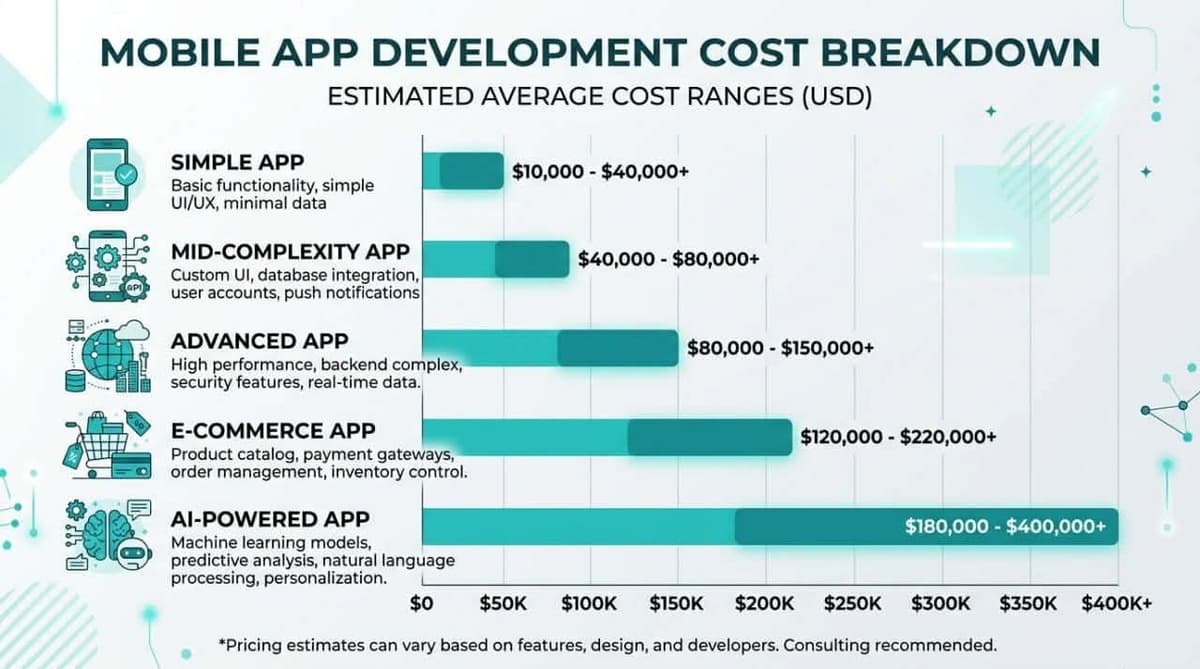
Mobile App Development Cost by App Type — 2026
The estimates below are grounded in current market data and regional project averages. Use them as a calibration baseline, not as a final quote.
| App Type | Cost Range (USD) | Real-World Example | Estimated Timeline |
|---|---|---|---|
| Simple app | $5,000 – $15,000 | Product catalog, basic appointment booking | 6 – 10 weeks |
| Mid-complexity app | $15,000 – $45,000 | Food delivery, employee attendance tracking | 3 – 5 months |
| Advanced app / platform | $45,000 – $100,000 | Multi-role service platform, marketplace | 5 – 9 months |
| E-commerce app | $20,000 – $65,000 | Full store with payments, inventory, shipping | 4 – 7 months |
| AI-powered app | $40,000 – $150,000+ | Intelligent assistant, automated data analysis | 6 – 12 months |
These are indicative estimates. Your actual mobile app development cost depends on your specific screen count, integration requirements, and target platform. See Dogtown Media's detailed cost breakdown for further reference.
iOS vs. Android vs. Both — How Platform Choice Affects Your Budget

Platform choice is one of the most consequential budget decisions you'll make early in your project. Here are your three options, plainly stated:
-
Single platform (iOS or Android): The lowest-cost, fastest-to-market option. A good fit if your customer base skews heavily toward one ecosystem — in the Gulf region, for example, iPhone penetration is substantially higher than the global average, making iOS-first a defensible starting point.
-
Flutter / React Native (cross-platform): One codebase, two platforms. This approach saves 30–40% compared to building two separate native apps and is the right call for the vast majority of business applications, unless you have specific technical requirements that demand native-only.
-
Native per platform (Swift + Kotlin): The most expensive path, but the right one for apps with demanding performance requirements — medical applications, professional camera tools, or 3D gaming experiences where platform-level optimization is non-negotiable.
For everyday business apps — delivery, booking, e-commerce, team management — Flutter and React Native deliver a user experience that's indistinguishable from native, at a meaningfully lower cost.
How to Cut Your App Budget Without Sacrificing Quality
There's no universal shortcut, but these five principles are consistently applied by founders who ship quality products without blowing their budgets:
-
Start with an MVP — resist the urge to build everything at once. Launch with your core features only, then iterate based on real user behavior. This approach typically saves 30–50% of your initial development budget and protects you from building features nobody actually needs.
-
Default to Flutter or React Native unless you have a clear technical reason not to. Two platforms for a 35% premium over one — that's real money saved with no meaningful quality trade-off for most products.
-
Document your requirements before development starts. Any change request raised after development is underway costs roughly three times what it would have cost to plan for upfront. A solid requirements document is the single most effective way to protect your budget and avoid delivery disputes.
-
Don't optimize solely for the lowest quote. A suspiciously low price almost always signals weak code architecture, inevitable maintenance costs, or a project that needs a full rebuild within twelve months. Price your decision over a three-year horizon, not just launch day.
-
For serious commercial projects, work with a specialist development company rather than a freelancer. Freelancers are well-suited for prototypes and small experiments. When your app is a core part of your business, you need a team with structured project management, rigorous QA, and accountable post-launch support — none of which a single person can reliably provide, regardless of their individual talent.
What Should a Professional Development Quote Actually Include?
A proper quote is not a number in an email. It's a document that protects you legally and ensures you receive exactly what you're paying for. Any credible quote from a mobile app development company should cover:
- Detailed Scope of Work: A named list of every screen and feature — no vague descriptions.
- Phase-by-phase cost breakdown: Design / Development / QA / Deployment — not a single lump sum.
- Milestone-based timeline: Specific delivery dates for each phase, not "approximately three months."
- Supported platforms and OS versions: Which iOS versions? Which Android versions?
- Source code ownership: An explicit clause confirming full ownership transfers to you upon final payment.
- Post-launch warranty period: How many months of bug fixes are included? What's covered?
- Revision policy: How many change requests are included? How are additional requests billed?
- Communication and project management: Who is your point of contact? What tool is used for tracking? How frequently do you receive updates?
The absence of any of these items from a quote you receive is not a minor oversight — it's a signal worth addressing directly before you sign anything.
The Hidden Cost Nobody Tells You About: Annual Maintenance

According to Dogtown Media, ongoing maintenance costs between 15% and 20% of your initial development spend per year. In practice: an app that cost $40,000 to build will require $6,000–$8,000 annually for updates, bug fixes, and compatibility with new iOS and Android releases.
On top of that, there are recurring operational costs to factor in — server hosting ($50–$500/month depending on traffic volume), payment gateway fees, and third-party service subscriptions. These numbers need to live in your budget before you make the decision to build, not after.
How You Pay: Fixed Price, Time and Materials, or Retainer
The pricing model changes your risk exposure as much as the number does, and it is rarely explained before a contract lands.
| Model | How it works | You carry the risk of | Best when |
|---|---|---|---|
| Fixed price | One agreed total for an agreed scope | Scope being wrong | Requirements are genuinely settled |
| Time and materials | Billed per hour or per sprint | Cost overrun | Scope will evolve as you learn |
| Retainer | A fixed monthly amount for ongoing capacity | Paying for idle capacity | Continuous development after launch |
| Milestone-based | Payment released per delivered stage | Mostly balanced | Most commercial projects |
Fixed price is not the safe option it appears to be. Because the vendor absorbs the scope risk, they price that risk in — typically a 20–30% buffer. You pay for it whether or not it is needed. Worse, it creates an adversarial incentive: every change becomes a negotiation, and the vendor is motivated to interpret the specification narrowly.
Time and materials is not a blank cheque if you cap it. A sprint budget with a written change threshold gives you the flexibility without the open-ended exposure.
What we generally recommend: milestone-based payments with a fixed scope for a well-defined phase one, then time and materials for evolution afterwards. It matches how software actually gets built.
Payment schedule red flags:
- More than 40% requested upfront
- No deliverable tied to any payment
- Final payment due before you have tested anything
- Source code released only after the final payment clears — see App Development Contracts for why this clause matters more than any other
The Three-Year Cost of Ownership
Comparing quotes on build price alone is the most common budgeting error. The build is typically 50–60% of what you spend in the first three years.
Here is a realistic picture for a mid-complexity app with an initial build of $30,000:
| Item | Year 1 | Year 2 | Year 3 |
|---|---|---|---|
| Initial build | $30,000 | — | — |
| Maintenance (15–20%) | $2,500 | $5,000 | $5,000 |
| Hosting and infrastructure | $1,200 | $1,800 | $2,400 |
| Developer accounts (Apple $99, Google $25 once) | $124 | $99 | $99 |
| Third-party services (SMS, push, analytics) | $600 | $900 | $1,200 |
| Feature development | $3,000 | $8,000 | $8,000 |
| Annual total | $37,424 | $15,799 | $16,699 |
Three-year total: roughly $70,000 — more than double the build price.
Two things this table makes visible that a quote never does:
- Maintenance is not optional. iOS and Android ship breaking changes annually. An unmaintained app degrades and is eventually delisted. Skipping year-two maintenance does not save money; it converts into a larger repair bill later.
- Feature development is the largest variable. A successful app generates feature requests. Budgeting zero for evolution means either the app stagnates or you face an unplanned expense.
For how to structure that ongoing commitment, see In-House Maintenance or a Contract?.
How Long Does It Take?
Timeline and cost are the same variable viewed differently — team size is what converts one into the other.
| App type | Timeline | Typical team |
|---|---|---|
| Simple app | 6 – 10 weeks | 1 developer, 1 designer, part-time PM |
| Mid-complexity | 3 – 5 months | 2–3 developers, designer, QA, PM |
| Advanced platform | 5 – 9 months | 4–6 developers, designer, QA, PM |
Where the time actually goes. Clients consistently expect development to dominate the schedule. It rarely does:
- Discovery and specification: 10–15%
- Design: 15–20%
- Development: 40–50%
- Testing and fixes: 15–20%
- Store submission and launch: 5–10%
Adding developers does not proportionally shorten the timeline. Coordination overhead grows with team size, and some work is inherently sequential — design must precede the screens that implement it. Doubling the team on a three-month project yields roughly two months, not 1.5.
What actually delays projects, in order of frequency:
- Slow client feedback and approvals — by a wide margin the biggest cause
- Scope changes mid-build
- Third-party integrations behaving differently than documented
- App Store review rejections (budget 1–2 weeks for the first submission)
- Content and assets arriving late
The first is worth dwelling on: it is the one delay entirely within your control, and it is the most common. Nominate one decision-maker with authority to approve, and agree a response window in the contract.
Related reading
- MVP or full product? — the biggest cost-reduction factor.
- Native or hybrid? — a 50–60% cost difference.
- App development contracts — the clauses that protect you.
Cost by app type:
- E-commerce app — $20k–65k
- Restaurant app — $12k–50k
- Travel and hotel booking — $25k–90k
- Real estate app — $25k–80k
- Delivery app — driver logistics
- Clinic booking app — regulated appointments
- Educational app — courses and lessons
Frequently asked questions
What is the average mobile app development cost in 2026?
The average ranges from $5,000 for a simple app to over $150,000 for a complex one. Most business apps fall between $15,000 and $45,000. The number follows screen count, features, and target platforms — not the size of the firm building it.
How many screens does my app need, and what does each cost?
A rough rule is that every screen adds between $500 and $2,000 to the total, covering design, development, and testing. A typical MVP needs between 6 and 12 screens.
Is cross-platform development genuinely cheaper?
Yes. Frameworks like Flutter and React Native cover both iOS and Android for only 30–40% more than a single platform, rather than doubling the budget. The exception is performance-critical apps such as games and video processing.
What does annual app maintenance cost?
Budget 15–20% of the initial development cost per year. That covers compatibility updates for new iOS and Android releases, bug fixes, and security library updates. Ignoring maintenance means an app that stops working within two years.
How do I avoid going over budget?
Document your requirements in detail before development starts. Every change requested after coding begins costs roughly three times what it would have cost if planned upfront. Good scoping is the cheapest investment in the entire project.
Should I start with an MVP or a full product?
Start with an MVP in most cases. You launch sooner, test the idea with real users, save 30–50% of the initial budget, and fund the next phase from actual results rather than assumptions.
Bottom Line: What Will Your App Actually Cost?
Mobile app development cost in 2026 isn't a fixed number — it's the product of decisions you make: which platform, how many screens, which features are truly essential, and which team you trust to execute.
Understanding these variables before you start is the single most effective way to make sure your budget matches your goals and you end up with an app that delivers real value — not just a project that was built on time, but one that was built right.