

React Native: A Complete Guide to Building Android and iOS Apps with JavaScript
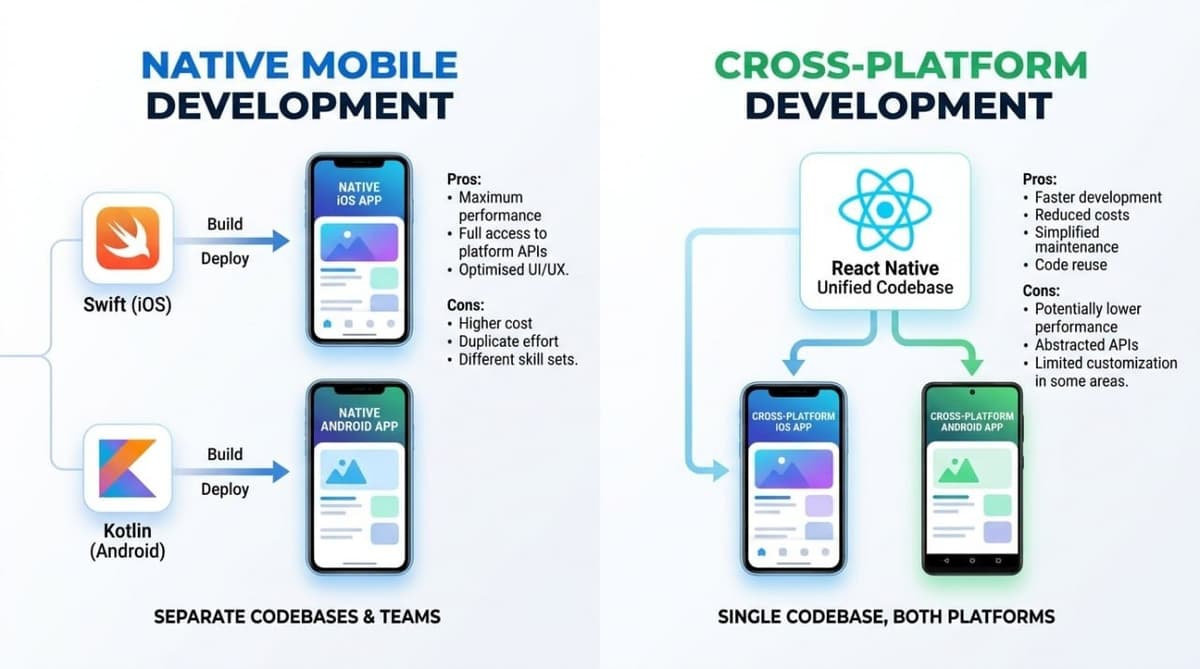
React Native is one of the most widely used cross-platform mobile frameworks, letting teams build apps that run on Android and iOS from a single JavaScript codebase while keeping performance close to native.
This approach cuts development cost and shortens time to market, which is why it became a default choice for startups and technology companies. If you are also weighing Flutter, the comparison section below will help you decide.
"The biggest mistake we made as a company was betting too much on HTML instead of native."
— Mark Zuckerberg, Meta (2012)
In 2012, Mark Zuckerberg admitted that leaning too heavily on web technology inside mobile apps had been a strategic mistake. Facebook's apps were built on HTML5, which produced weak performance and an unstable experience. The company later moved toward native components — the shift that paved the way for React Native.
What is React Native?
React Native is an open-source framework from Meta built on the React library for user interfaces. Unlike web development, it renders native components rather than HTML.
The core idea: you write your interface in JavaScript with familiar React syntax, but what appears on screen is not a web page inside a miniature browser — it is genuine native UI elements provided by the operating system itself. The button you write becomes a UIButton on iOS and an android.widget.Button on Android.
This is what separates React Native from older WebView-based hybrid apps. Those were websites disguised as apps, and users could tell immediately.
How React Native works (the internal architecture)
Understanding the internals explains both the framework's strengths and its limits.
A React Native app runs on two main threads:
- The JavaScript thread — executes your application logic: calculations, state management, network calls.
- The main (native/UI) thread — draws the interface and receives user touches.
Between them sits a communication layer. In the older architecture this was called the JavaScript Bridge, passing asynchronous messages serialised as JSON. That layer was the framework's most notorious bottleneck: pushing large volumes of data across it — a long list during fast scrolling, for example — caused messages to queue and visible stutter to appear.
The new architecture (JSI and Fabric)
Since version 0.68, Meta has been rolling out a new architecture that addresses this at the root:
- JSI (JavaScript Interface): lets JavaScript call native functions directly without JSON serialisation, removing the primary bottleneck.
- Fabric: a new rendering system that makes UI updates more synchronous and responsive.
- TurboModules: loads native modules on demand rather than all at startup, reducing launch time.
What this means in practice: many of the performance criticisms you will read in older articles (2019–2021) no longer hold. If you are evaluating React Native based on a four-year-old post, you are evaluating a different framework.
The framework also provides Fast Refresh, which reflects your edits on a device in under a second without losing application state — one of the strongest reasons development moves quickly on it.
Advantages of React Native
- One codebase for two platforms, typically saving 30–40% of development time and cost.
- Reusable team expertise: any React web developer can move to mobile in weeks rather than months.
- Shared business logic between web and mobile (validation, data models, API calls).
- Enormous ecosystem: millions of npm packages, plus mature libraries for navigation, state, and animation.
- Over-the-air updates: with tools like Expo you can ship a fix to users without waiting for store review — something native development cannot offer.
- Native code escape hatch for any component that needs bespoke performance.
Limitations of React Native (honestly)
No framework is perfect, and these constraints are real:
- Performance in very heavy scenarios: 3D games, live video processing, or complex 60fps graphics — native still wins.
- Third-party dependency: covering some OS capabilities means relying on community packages whose maintenance can lag.
- App size: several megabytes larger than a native equivalent because the JavaScript engine ships with it.
- Upgrade pain: moving between major versions was historically painful, though modern upgrade tooling has improved this considerably.
- Delayed support for new OS features: a new iOS capability may take weeks before a stable package exists.
React Native vs Flutter — a practical comparison
This is the real decision most teams face. There is no absolute answer, only the one that fits your context.
| Criterion | React Native | Flutter |
|---|---|---|
| Language | JavaScript / TypeScript | Dart |
| Rendering | Native OS components | Custom engine (Impeller/Skia) |
| Default look | Matches each platform automatically | Consistent across both |
| Learning curve | Easy for React teams | Requires learning Dart |
| Graphics performance | Excellent since the new architecture | Excellent and consistent |
| Arabic / RTL support | Good, needs manual tuning | Excellent, deeply built in |
| Community size | Enormous (npm ecosystem) | Large and growing fast |
| OTA updates | Available via Expo | Limited |
Choose React Native if: you have a React web team · you want to share code between web and mobile · you need instant updates without store review · hiring is a priority (JavaScript developers are more plentiful).
Choose Flutter if: you are starting from scratch with no legacy · you want a precisely controlled, unified visual identity · your project depends on complex Arabic RTL interfaces · you need perfectly consistent graphics performance.
At APEX we use Flutter as our default for most Gulf business apps because of its mature Arabic support, but we choose React Native when a client has an existing React team or needs code sharing with a web platform. The decision follows your project, not our preference. See our mobile app development services for how we scope projects.
Well-known apps built with React Native
| App | Scope of use |
|---|---|
| Portions of the main app | |
| Several screens within the app | |
| Discord | Nearly the entire mobile app |
| Shopify | Merchant applications |
| Microsoft Office | Parts of the mobile apps |
| Selected screens |
An important nuance: most of these companies use React Native partially, embedded inside a native app. That common and successful pattern is known as the brownfield approach, and it demonstrates the framework is production-ready at scale.
When not to use React Native
Honesty here saves you months of wasted work. Avoid it if your project is:
- A game — use Unity or Godot.
- Heavily media-processing such as video editing or real-time camera effects.
- A simple single-platform app — native is faster and lighter in that case.
- Dependent on brand-new OS features at launch — waiting for library support will block you.
Frequently asked questions
Is React Native suitable for large projects?
Yes. It runs in production products with millions of users, such as Discord and Shopify. The challenge in large projects is architectural discipline and state management, not the framework itself.
Is it better than Flutter?
There is no absolute "better". See the comparison table above: React Native wins when you have a React team; Flutter wins on visual control and Arabic support. For a full guide, read the complete Flutter guide.
Can it be used for the web?
Yes, via React Native Web, which allows substantial code sharing between mobile and browser. In practice it suits dashboards and internal tools better than marketing websites.
How much does a React Native app cost?
Cost follows project scope, not the framework. A basic app starts around $8,000 and complex platforms can exceed $120,000. See our detailed guide: mobile app development cost in the Gulf.
Does it support Arabic and RTL?
Yes, through the built-in I18nManager API. However, support requires more manual tuning than Flutter, particularly for mirroring graphics and animations. This matters when building for the Gulf market.
Conclusion
React Native offers a practical balance between development speed and performance, and its new architecture (JSI and Fabric) has addressed its most significant historical criticisms.
It is the stronger choice when you have an existing React team, need code sharing between web and mobile, or want instant updates without waiting on app stores. If you are starting from scratch and targeting Arabic audiences with complex RTL interfaces, Flutter may suit you better.
Need help choosing the right technology for your project? Get in touch and we will give you a straight opinion based on your requirements — even if the recommendation is not to build an app at all.